If you live in Quetta or in some other area of Balochistan, you must be a QESCO user. This website allows the users of QESCO (Quetta Electric Supply Company) to check their bills online.
This facility saves the time, effort, and hassle of the electricity consumers. With QESCO Online Bill Checker, they can instantly view, download, and print their bills.
To check your bijli ka bill, choose “QESCO”, enter your reference number or consumer ID, click “Submit”, and you will be redirected to your official QESCO Bill.
 Search Your Electricity Bill
What is QESCO (Quetta Electric Supply Company)
QESCO is an electricity distribution company that supplies electricity throughout Balochistan except for the district of Labela because the district of Lasbela falls under the K-electric.
The Ministry of Energy (Power Division) controls and manages the working of QESCO. And it is regulated by NEPRA (National Electric Power Regulatory Authority). The head office of QESCO is on Main Zarghoon Road, Quetta Cant, near the CCPO Office, Quetta, Pakistan.
History of QESCO
QESCO emerged as an independent electricity distribution company in the late 1990s. Before its independent operations the electricity supply of the Balochistan region was managed by WAPDA. Following is the detailed history of this company:
Origin of QESCO
Before the emergence of QESCO as an independent company, WAPDA (Water and Power Development Authority) was responsible for the distribution of electricity in all regions of Pakistan.
WAPDA’s Area Electricity Board (AEB) Quetta was responsible for the maintenance, distribution and billing of electricity all across Balochistan.
Restructuring and Corporatization (1998 – 2001)
In the late 1990s the government of Pakistan introduced reforms to enhance the efficiency of WAPDA and to reduce the operational losses and cost of the electricity distribution across Pakistan.
As part of these reforms:
- WAPDA was divided into Generation Companies (GENCOs), Transmission Companies (NTDC), Distribution Companies (DISCOs)
During this restructuring the Area Electricity Board Quetta was corporatized as an independent entity, and it was renamed as Quetta Electricity Supply Company (QESCO).
Incorporation as a DISCO
After this corporatization, QESCO became one of Pakistan’s official DISCOs (Distribution Company).
Now it independently controlled all operations including: electricity distribution, grid maintenance, customer billing, and operational management across Balochistan.
Modernization and Current Role of QESCO
With growth of population, the electricity demand has increased across Balochistan in the last 2 decades. To meet these needs QESCO has expanded and modernized its operations.
Key developments include:
- Expansion of grid stations and transmission networks
- Introduction of online bill checking and complaint registration systems
- Implementation of solar net metering for renewable energy users
- Compliance with NEPRA regulations
- Electrification of remote and rural areas.
QESCO is growing and evolving to meet the challenges like vast terrain, scattered population etc.
Steps to Check QESCO Bill Online
With QESCO online bill checker, it has become super easy for the electricity consumers of Balochistan to check and pay their bills. They can simply do this on their phones.
Search Your Electricity BillFollowing is the step-by-step guide to check your bill online:
Step 1: Put Your Reference Number or Consumer ID
In the given bijli ka bill (electricity bill) checker, select “QESCO”.
Step 2: Put Your Reference Number or Consumer ID
In the bill checker, you will have to put either your reference number (a 14 digit number that is assigned to your electricity connection), or your consumer ID (a 10 digit number given to your account).
Step 3: Click the “Submit” Button
After entering your reference number or consumer ID, you click at the “Submit” button, and your bill will be shown to you.
Step 4: View Your Bill
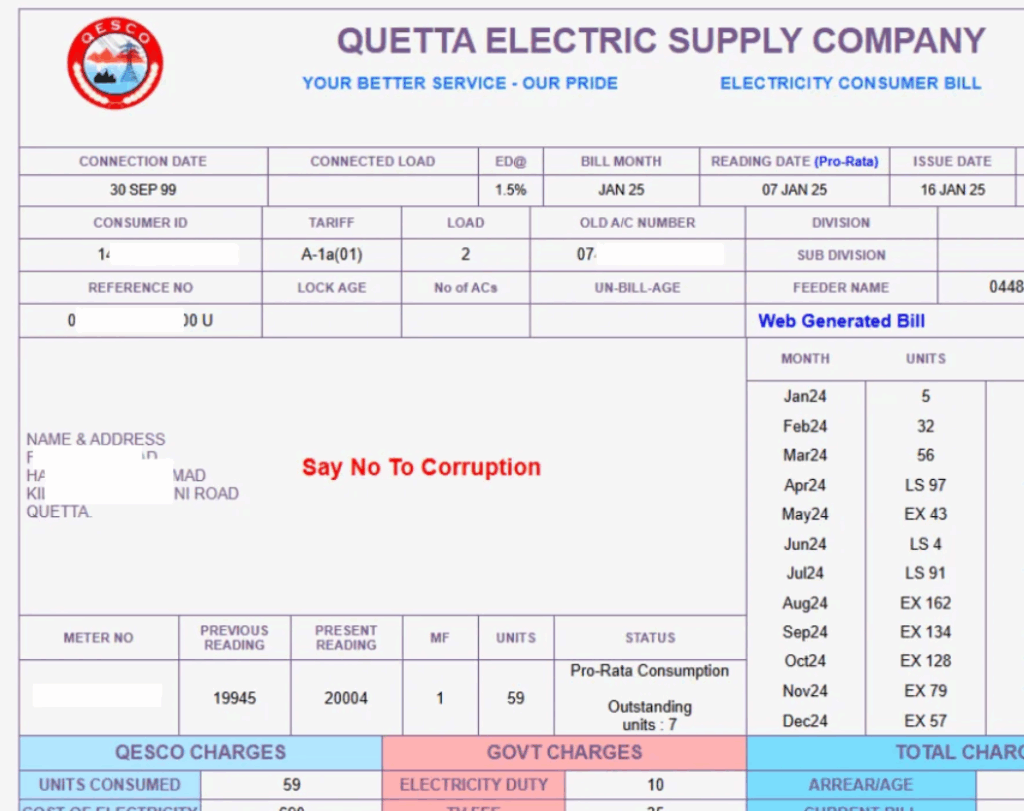
Once you click the “View Bill” button, you will be redirected to a new tab, and you will be shown your full bill.
Step 5: Download and Print Your Bill
You can download this bill as a PDF. You can print it as well to get a duplicate copy of your bill.
Areas Covered By QESCO
QESCO distributes electricity to Balochistan which is the largest province of Pakistan, and it covers 43% of Pakistan’s total area.
That is why QESCO is one of the largest electricity distribution companies of Pakistan, and it supplies electricity to 34 districts of Balochistan except Lasbela. Following is the list of these districts:
- Awaran
- Barkhan
- Bolan / Kachhi
- Chagai
- Dera Bugti
- Gwadar
- Harnai
- Jafarabad (Jaffarabad)
- Jhal Magsi
- Kalat
- Kech (Turbat)
- Kharan
- Khuzdar
- Kohlu
- Loralai
- Mastung
- Musakhel
- Naseerabad
- Nushki
- Panjgur
- Pishin
- Qilla Abdullah
- Qilla Saifullah
- Quetta
- Sibi
- Sherani
- Washuk
- Ziarat
- Zhob
- Killa Abdullah (Chaman)
- Dukki (Duki)
- Surab (Shaheed Sikandarabad)
- Harnai
- Muslim Bagh
How to Pay QESCO Bill Online?
QESCO has made the payment of bills easier for its consumers because it gives multiple online bill payment options.
The users have a lot of options for payment of QESCO bills online. These options include: Jazcash, Easypaisa, and Banking apps etc.
Following is the detailed guide how you can use any of these apps to pay your bills:
Bill Payment Using Jazcash
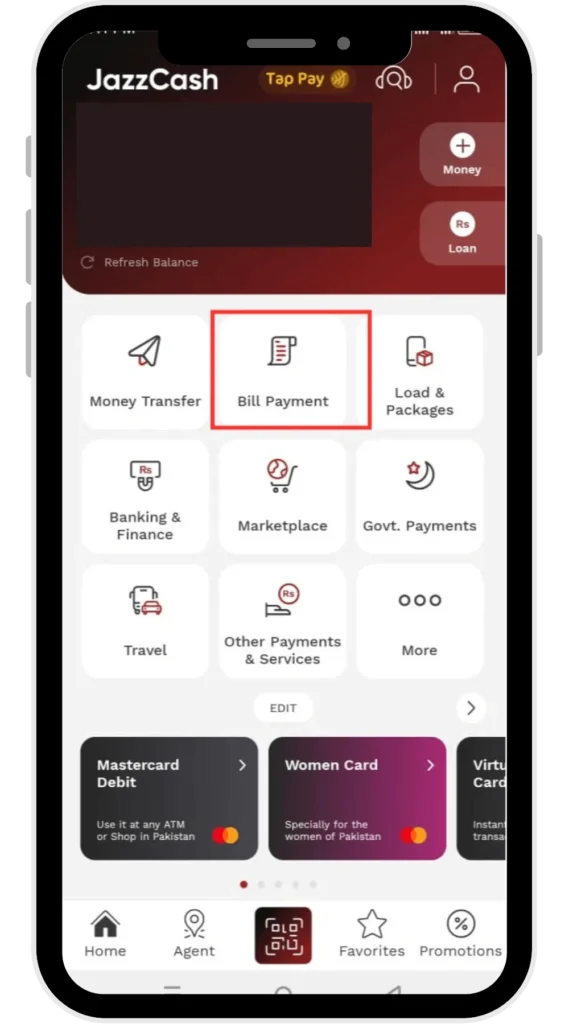
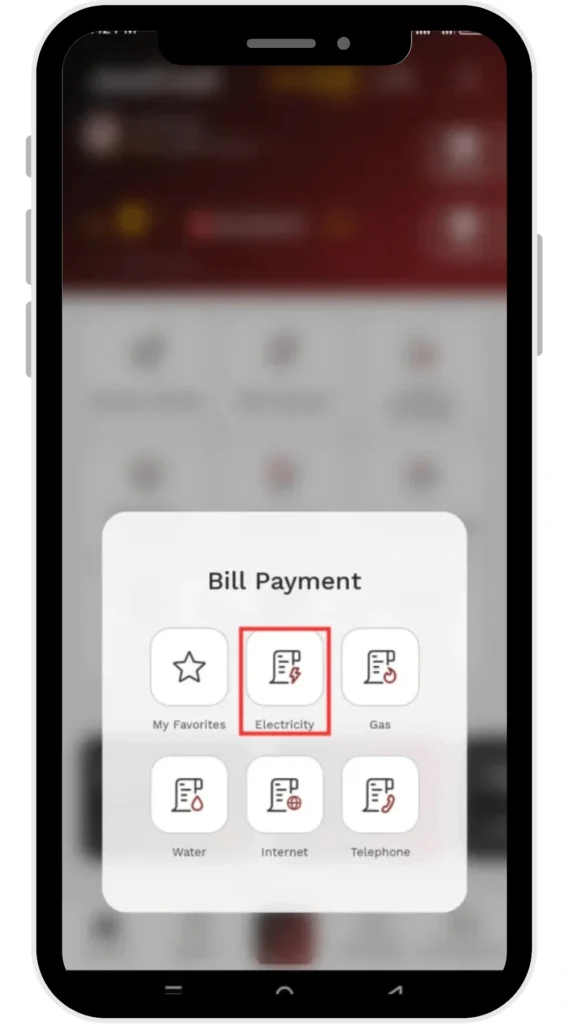
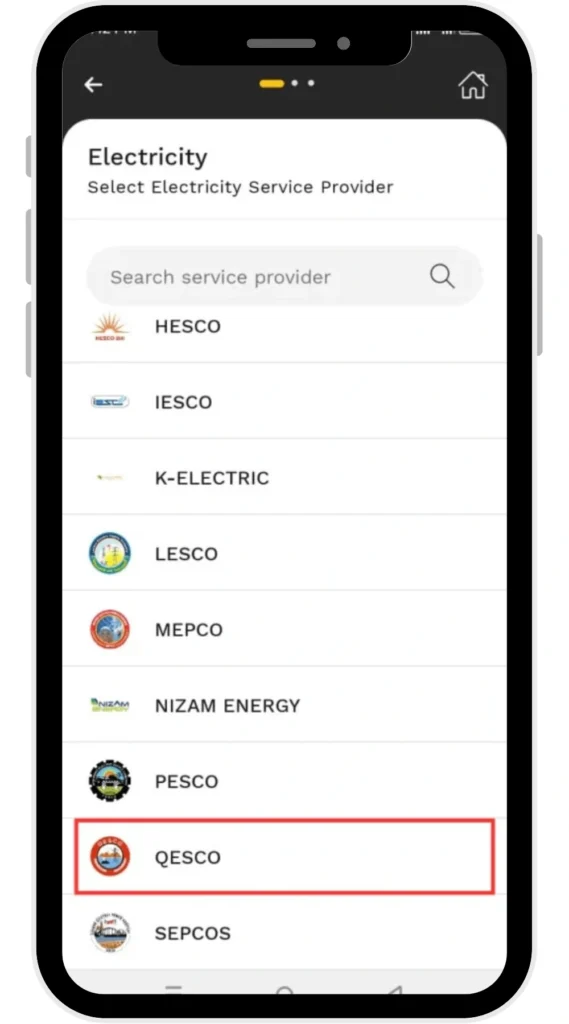
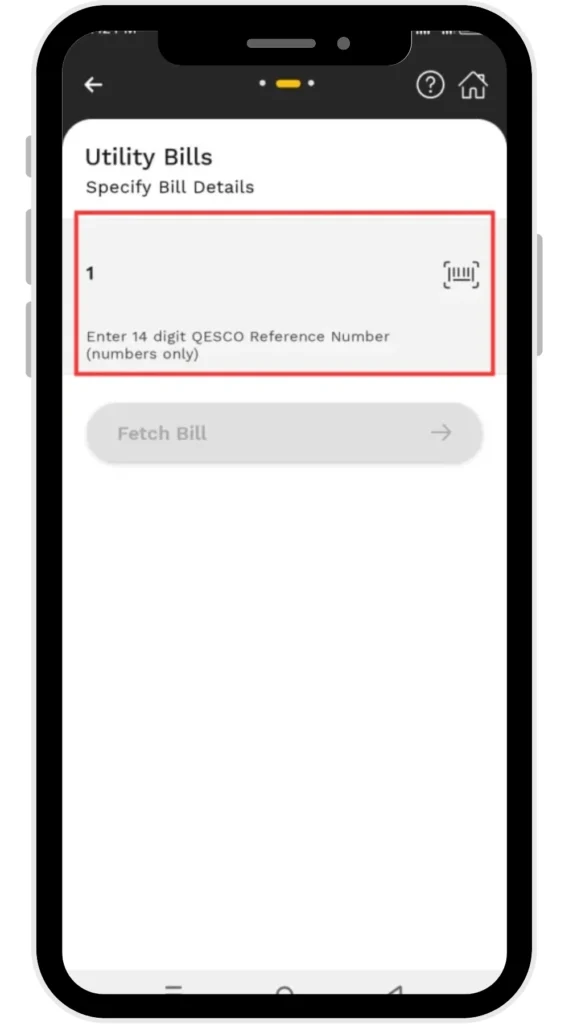
Paying your bill through Jazcash is super easy. By following the given steps you easily pay your bill:
- Login to your Jazcash Account
- Tap the “Bill Payment” option
- Click “Electricity”
- Choose “QESCO Bill” from the list
- Put your reference no.
- Confirm the Payment
Bill Payment Using Easypaisa
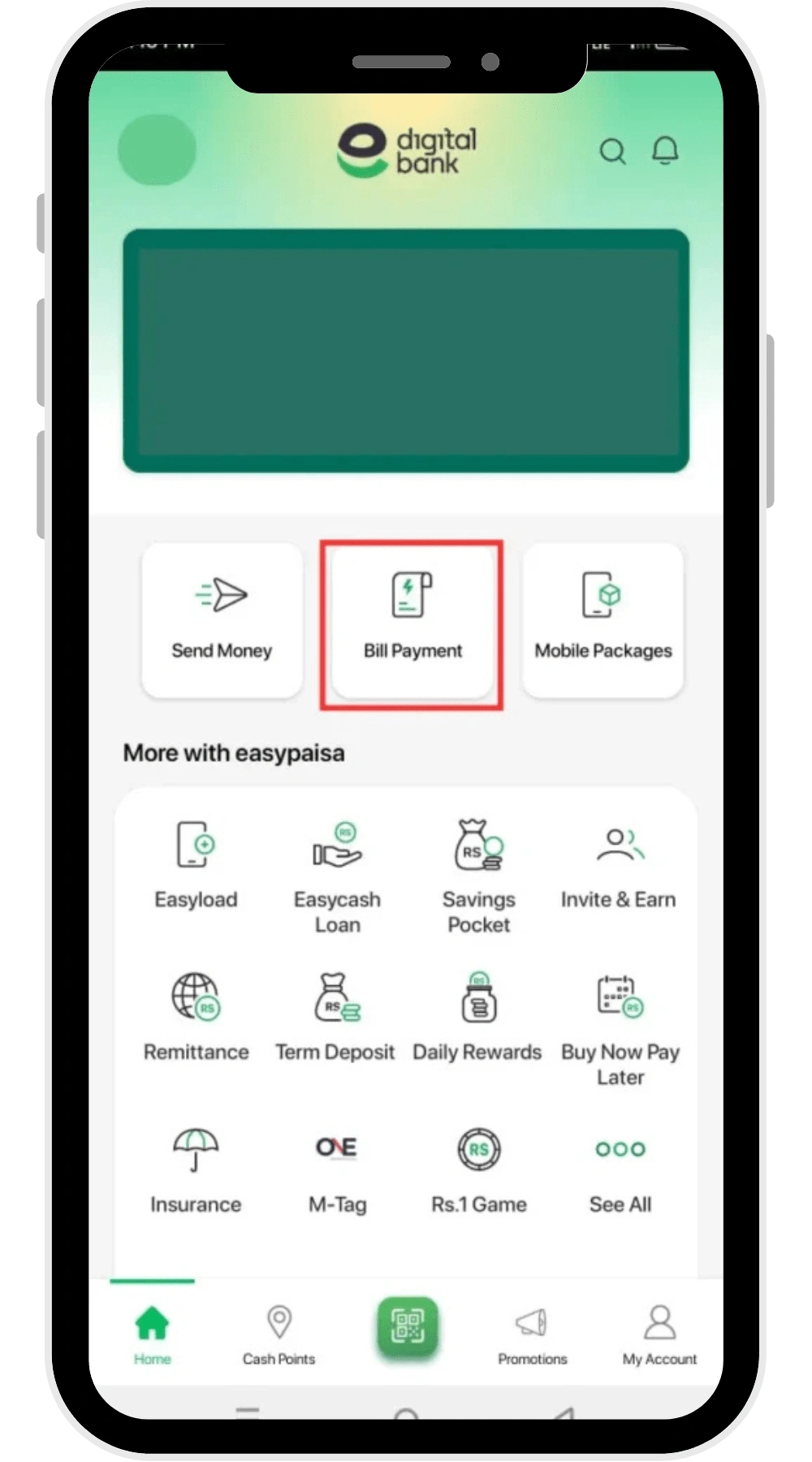
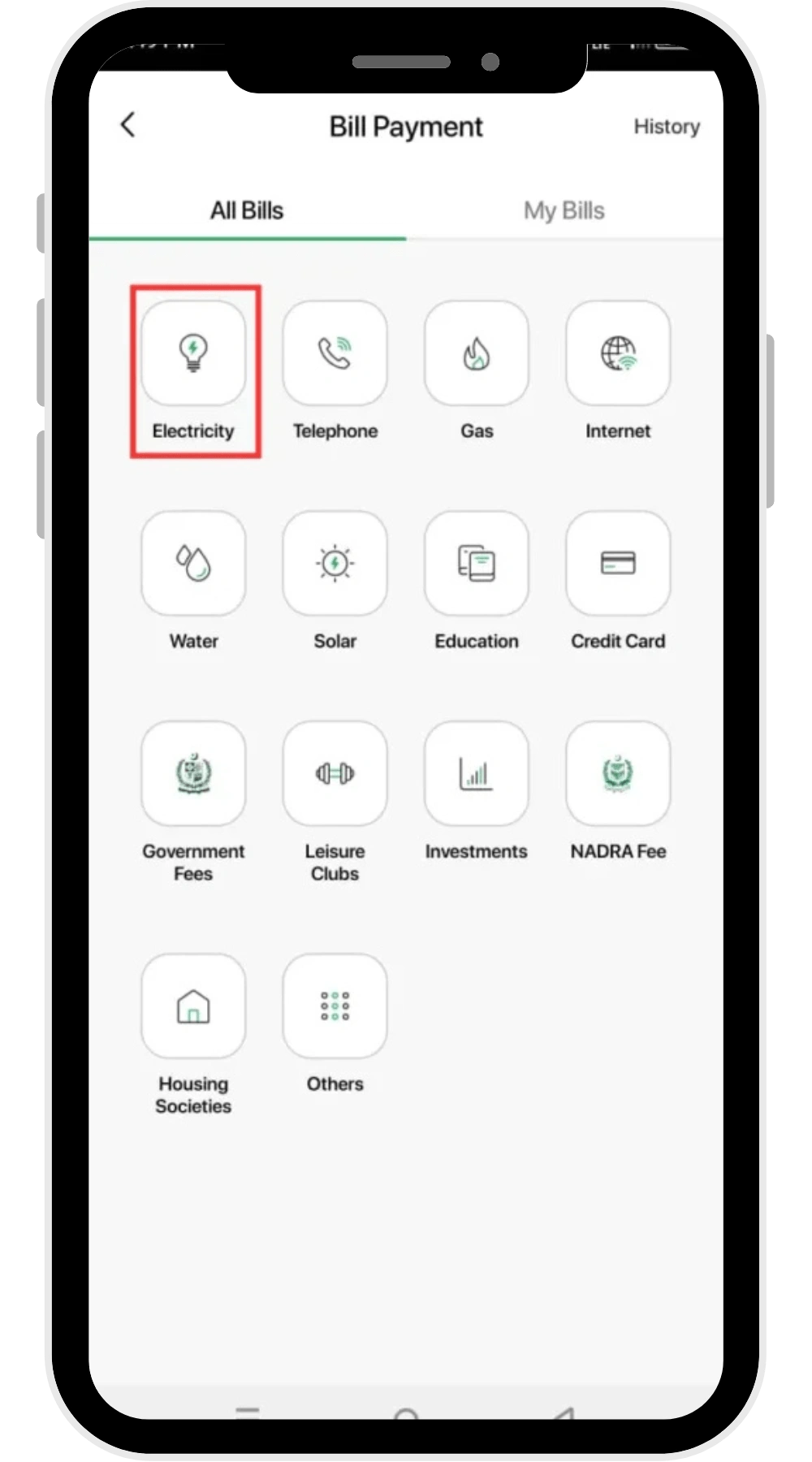
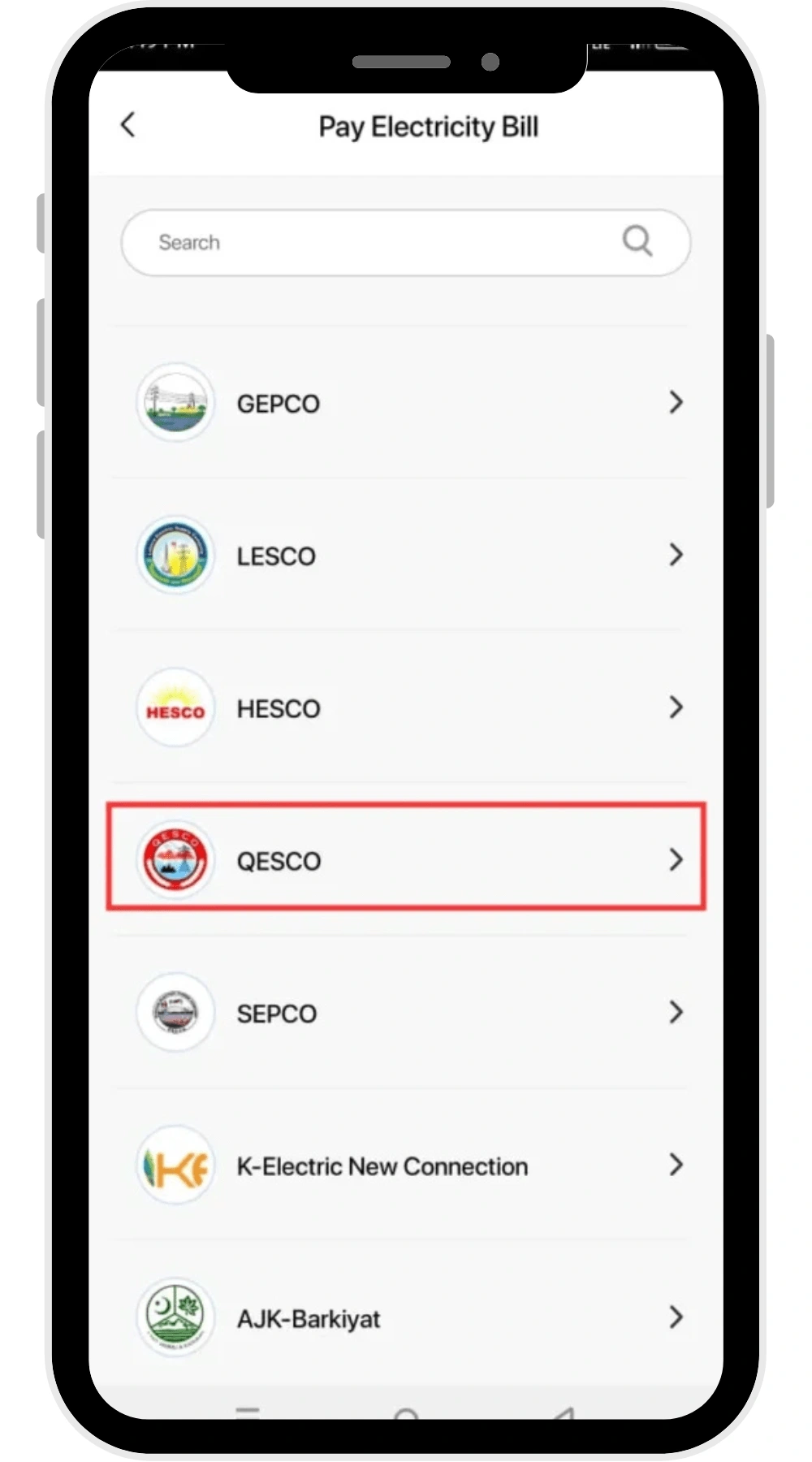
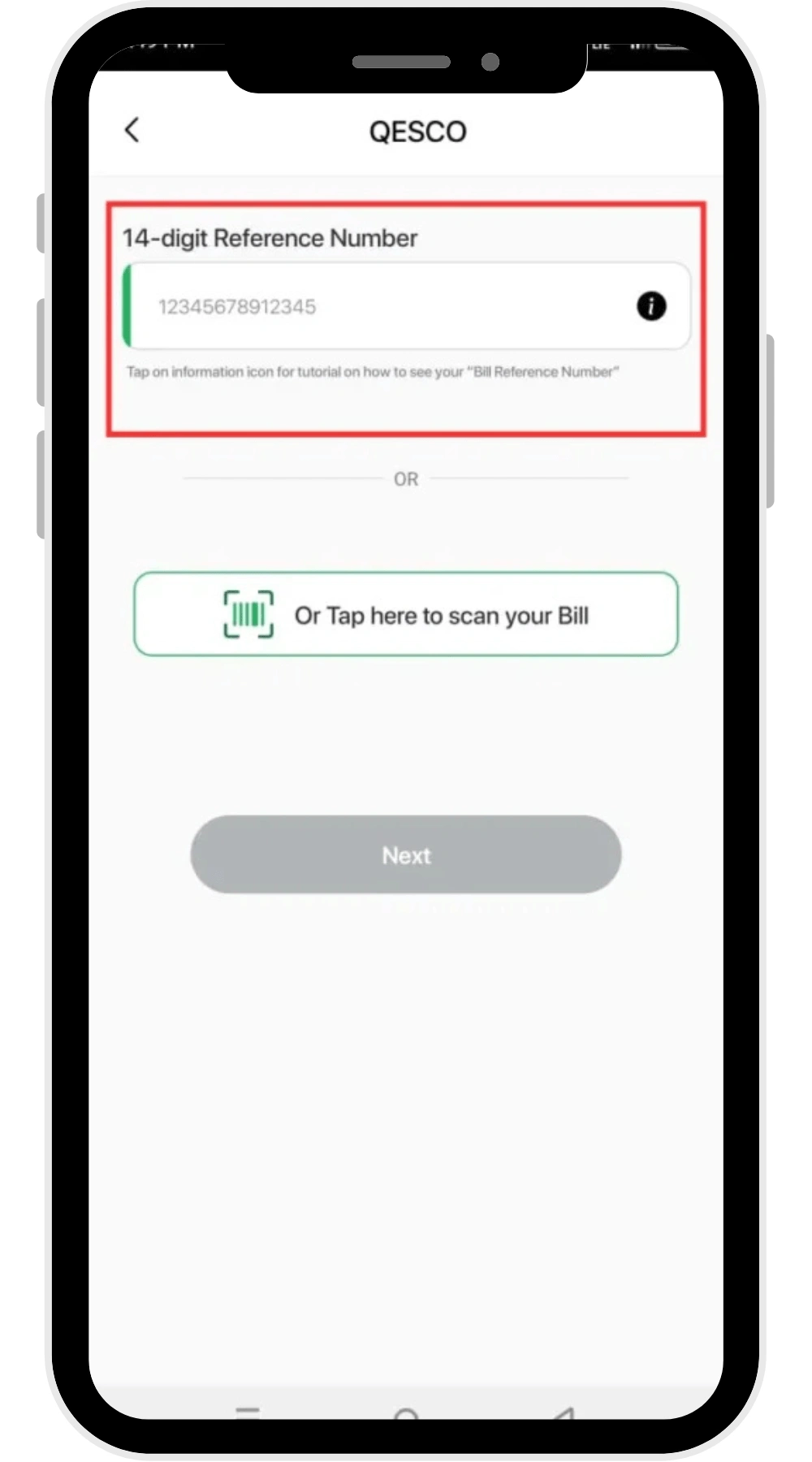
You can quickly pay your bill using easypaisa. Follow the following simple steps:
- Login to your Easypaisa account
- Choose the “Bill Payment” option
- Click “Electricity”
- Choose “QESCO” from the list
- Enter your reference number
- And confirm the payment of your bill
Bill Payment Through Banking Apps
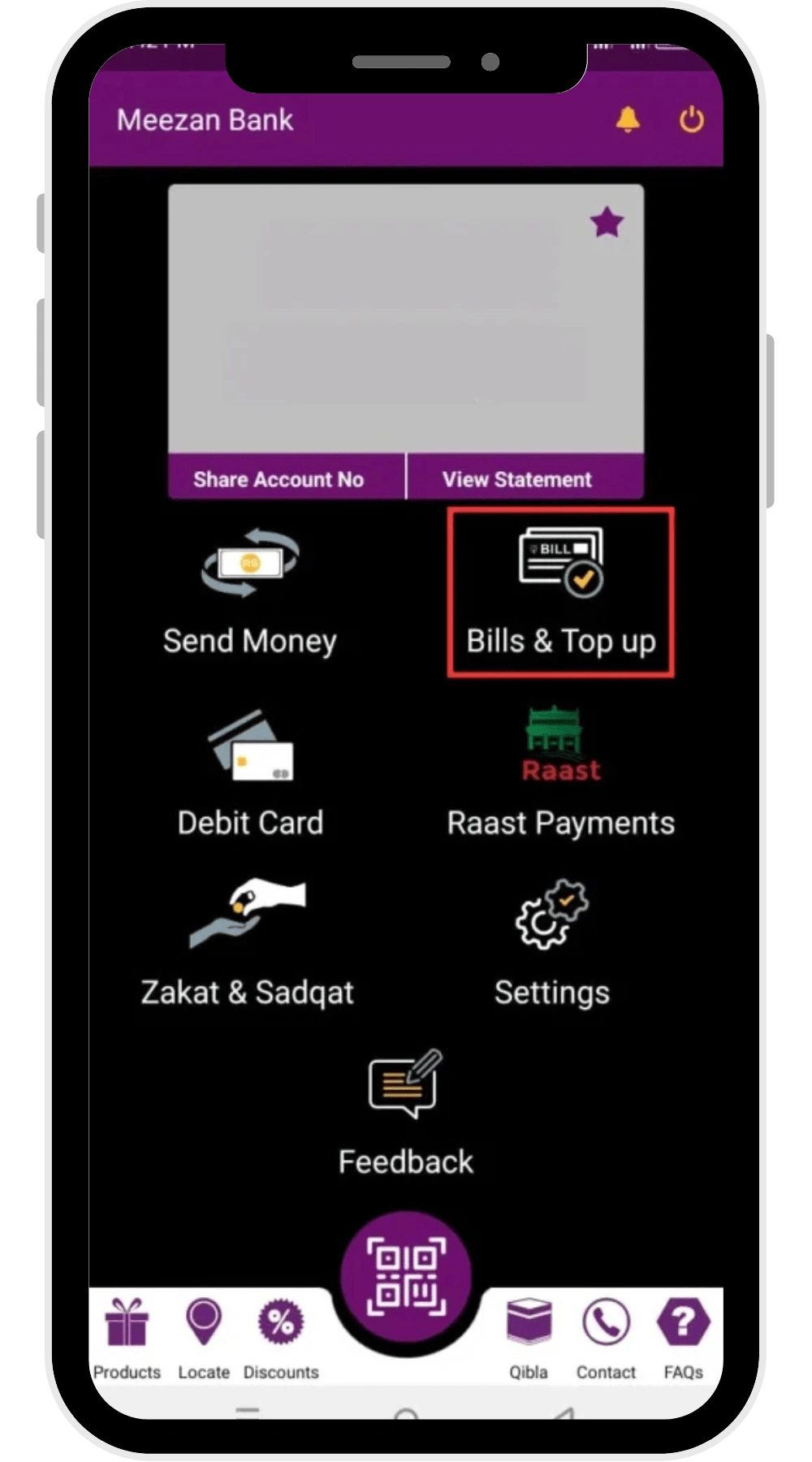
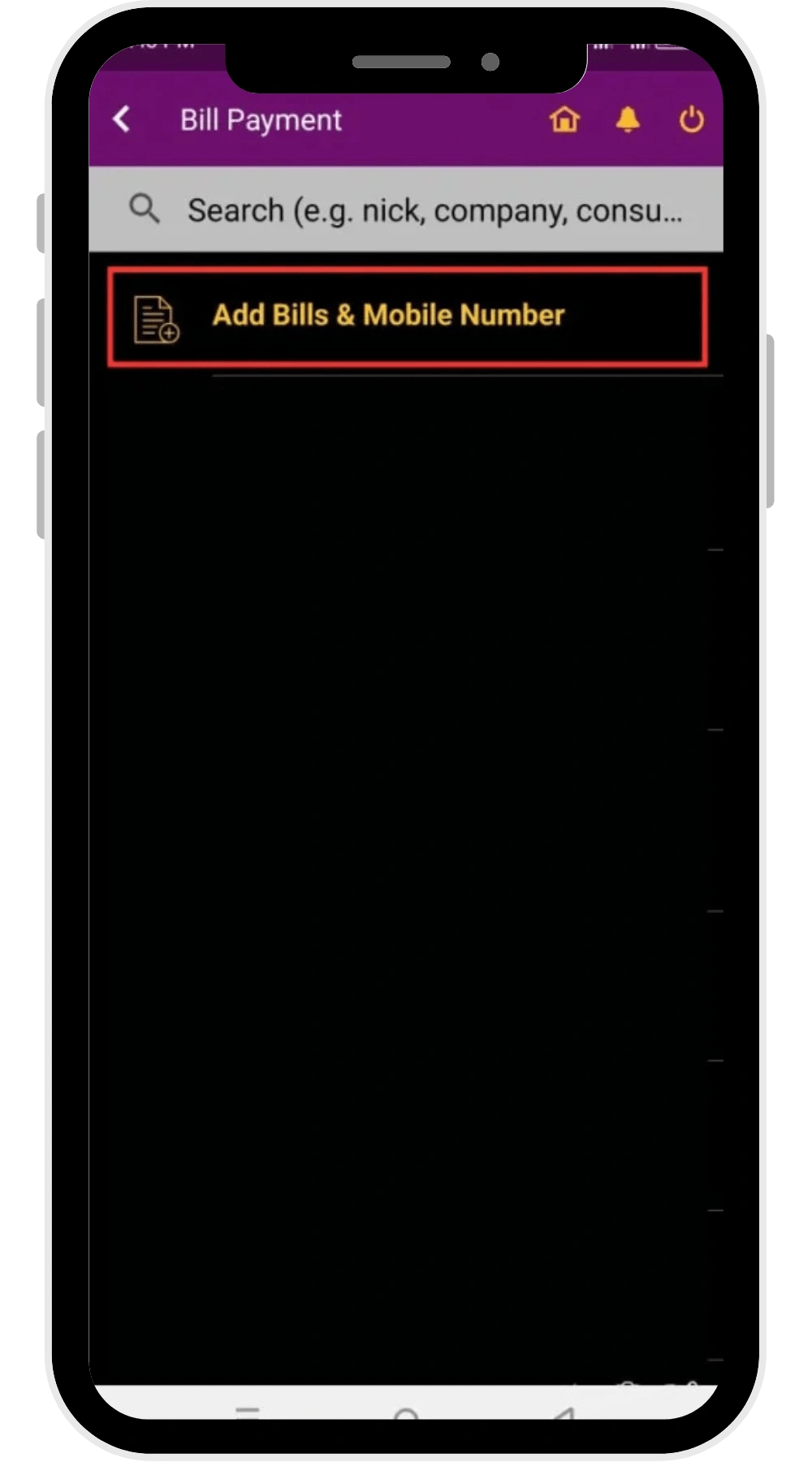
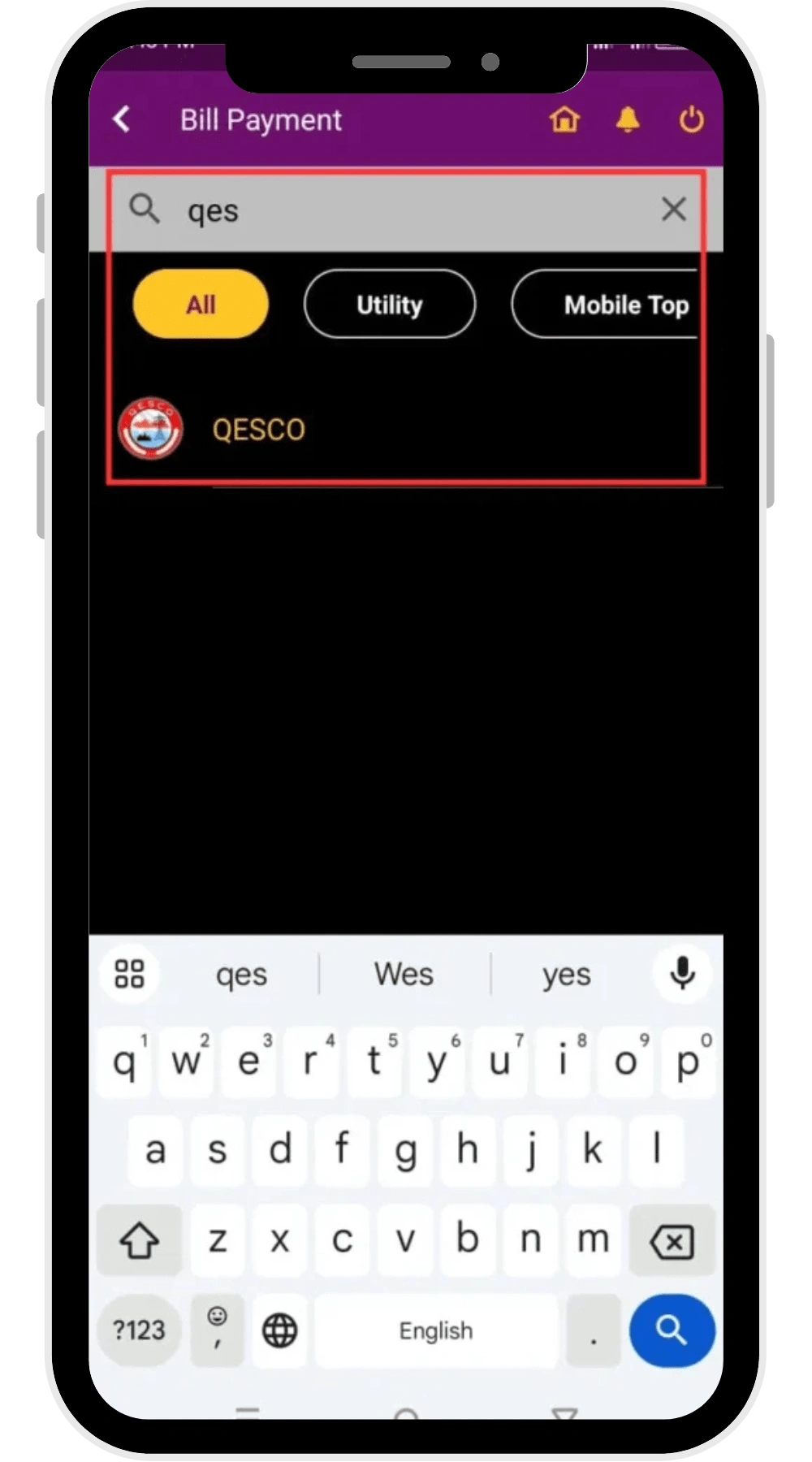
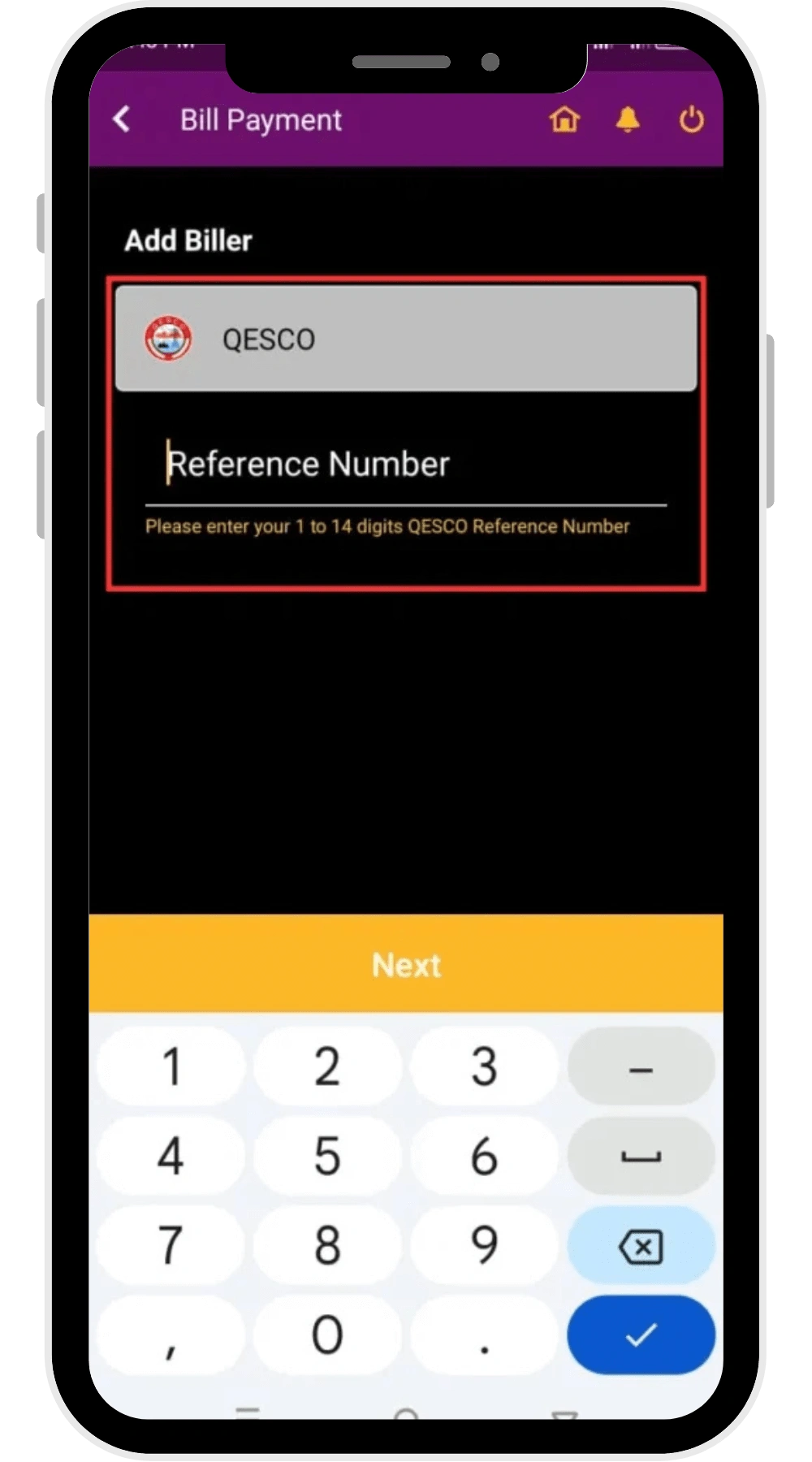
You can easily pay your QESCO bill using banking apps like Meezan, Alflah, UBL, HBL, and MCB Live. Following are the steps that you can follow to pay your bill through the bank:
- Login to your bank account
- Go to the “Bills” section
- Choose “QESCO” from the list
- Enter your reference number
- And confirm the payment
QESCO Offline Bill Payment Methods
Despite paying your bill by using the online bill payment methods, you can pay your bill offline as well. You can pay your bill by hand at:
- Bank Branches like UBL, HBL, Meezan, MCB etc.
- Post Offices
- Retail Shops
Just go to any of these locations, and pay your QESCO bill by hand.
QESCO Contact Details
QESCO provides its users with amazing customer support. In case of any issue related to your electricity supply or bills, you can contact their support for help:
- QESCO Helpline & Complaint Number: 081-9201445
Head Office Address: Zarghoon Road, Quetta, Pakistan
Benefits of QESCO Bill Online Check
You should use the online method of checking your bill because it gives you the following benefits:
- Check your bill anytime and anywhere on your mobile or laptop without any effort, and free of cost.
- Download the bill in PDF form.
- Print the duplicate copy of your bill.
- Track billing history.
- Quick and easy online bill payments.
FAQs
What should I do if my QESCO Bill is not showing online?
If your bill is not showing online, double check your reference number or consumer ID, or check your internet connection.
Can I download a duplicate copy of my QESCO bill?
Yes, you can download the duplicate copy of your QESCO bill.
How do I calculate my QESCO bill?
Go to the QESCO bill calculator, put the units consumed, click the “Calculate” button, and your bill will be calculated.
What are the online payment methods for QESCO bills?
Paying your QESCO bill online is easier and faster. You can pay your bill online through applications like Jazcash, Easypaisa, and Bank Apps etc.
How can I apply for the new QESCO connection?
Visit the ENC (Electricity New Connection) portal, fill the form, and submit the required documents. This way your new connection application will be submitted.
How do I change my name on the QESCO bill connection?
Go to your nearest QESCO bill office, and submit your CNIC copy, property documents, applicant form, previous bill copy, and the application to change the name.
What is Net Metering and does QESCO support it?
Yes, QESCO supports solar net metering under NEPRA regulations. This allows consumers to sell excess solar units back to the grid.
Conclusion
QESCO online bill checker allows the users to access their bill conveniently. You can check, download, print and pay your bill easily and instantly.
These facilities are proof that the QESCO is evolving and modernizing its operations.